
pgBrain
Pro PostgreSQL for macOS
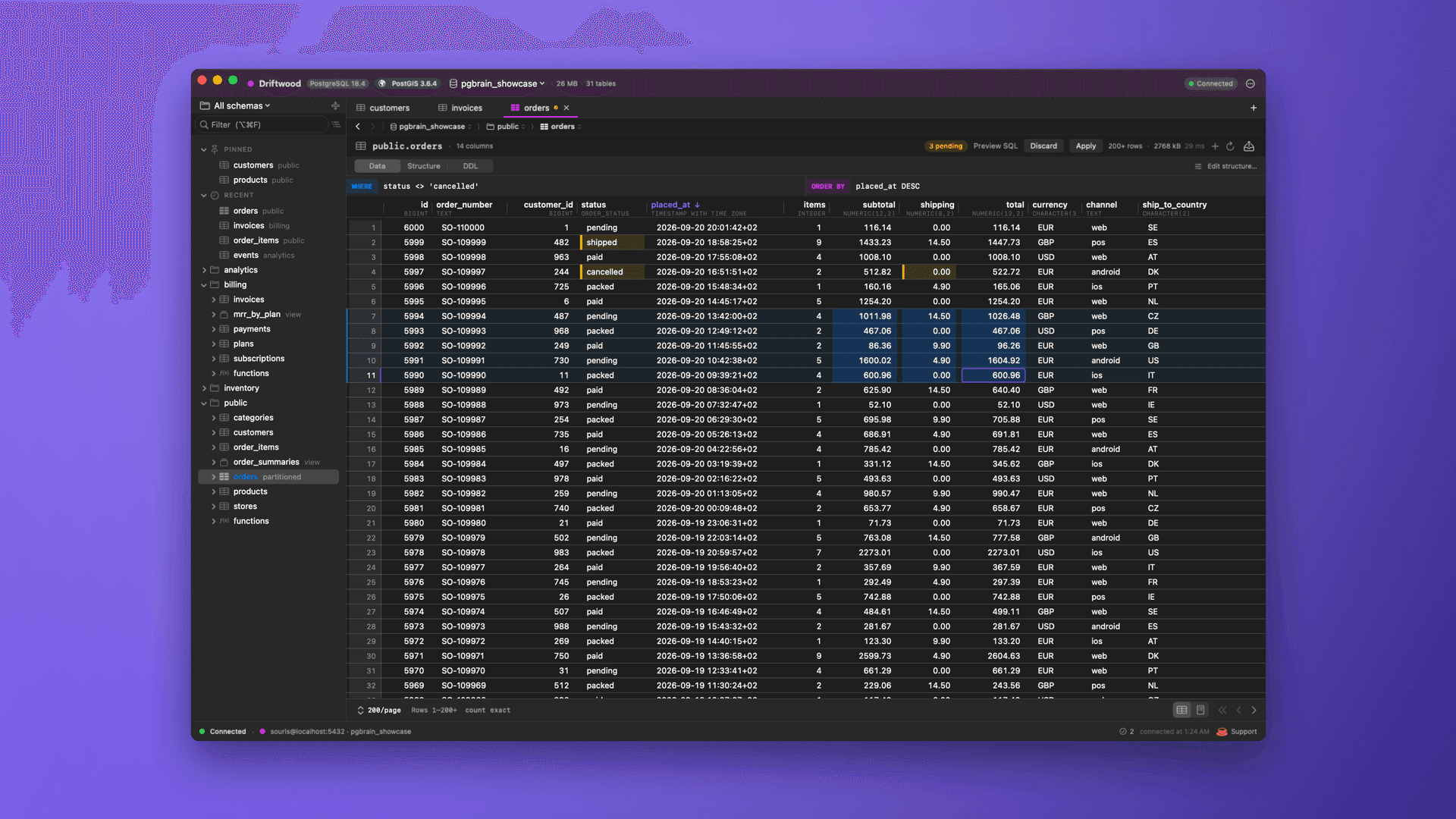
DataGrip-class PostgreSQL workflows in a shell that actually feels like a Mac. Windows per connection, an editable grid, a notebook scratchpad, and a full DBA toolkit — native SwiftUI + AppKit, no Electron, no subscription, no telemetry.
New in 0.10
Rebuilt navigation, a safer grid, real scratchpad sessions
🧭
Navigation That Stays Put
A sidebar that remembers what you expanded, a schema picker, Pinned and Recent tables, a fuzzy filter (pub.us → public.users), preview tabs, a breadcrumb bar, back / forward and ⌘O Go to Table.
🗄️
One Window per Database
Switch databases from the title bar — each opens in its own window, remembered across relaunches.
📋
Spreadsheet-Grade Grid
Cell and range selection, copy and paste as TSV, type to edit, ⌫ for NULL, undo and redo. Tables without a primary key are editable too.
🛡️
Nothing Changes Until You Say So
Every edit is staged. Preview the exact SQL, apply it in one transaction — and pgBrain refuses to overwrite a row someone else changed meanwhile.
🔗
Real Scratchpad Sessions
Each scratchpad keeps its own session: SET, temp tables and BEGIN carry over, with a transaction indicator and Commit / Roll Back. Every type renders exactly as psql prints it.
🔄
Survives Sleep
Connections notice a dead link after sleep or a network change and reconnect on their own; SSH tunnels restart. Read-only mode, timeouts, custom CA and client certificates.
👋
Guided Tour
A one-minute spotlight tour of the window and its shortcuts the first time you connect.
🧪
Dozens of Fixes
A full audit fixed bugs that could silently cut writes short, swap CSV columns or shift timestamps. 690 automated tests, up from 341.
Highlights
The day-to-day, done right
🗺️
PostGIS, Mapped
Spatial databases are auto-detected. Geometry reads as WKT everywhere, and any result with a geometry column gets a Map view that plots points, lines, and polygons on a real map.
🏗️
Build Tables & Indexes
Visual CREATE TABLE and CREATE INDEX — pick columns, types, keys, methods, partial predicates, with a live SQL preview. No hand-writing DDL.
🌳
JSON, Two Ways
Edit JSON/JSONB as text with prettify/validate, or flip to a collapsible, type-coloured tree to read deep nested values at a glance.
🧮
Column Profiler
Right-click any column for row, null, and distinct counts — with a populated bar — plus min, max, and avg. Scoped to your active filter.
🗑️
Staged Row Deletes
Right-click a row or a whole selection to stage a delete; it commits on Apply in the same transaction as your edits — and only if the row still matches what you saw.
📑
Copy As…
Lift any result block or table page to the clipboard as a Markdown table, JSON, TSV, or CSV — paste straight into a doc, a spreadsheet, or a PR.
🔔
Live Feedback
Every export, import, copy, and edit flashes a toast with the row count. Failures show the server's message instead of failing silently.
📝
Notebook Scratchpad
SQL and results in one flowing document. ⌘⏎ runs the statement under your caret and inlines the result, on the scratchpad's own session. Pivot or chart any result in place.
📋
Editable Data Grid
Select ranges, type to edit, paste from a spreadsheet, Apply as one transaction. Or flip to a single-row form view. Filter, sort, stable paging, distinct values, FK ⌘-click navigation.
🗺️
ERD & Schema Tools
Relationship diagrams, a structure pane with constraints, indexes, triggers and partitions, plus editors for functions, views, columns, schemas, and databases.
🧰
Full DBA Toolkit
Live activity, locks, index usage, pg_stat_statements, size dashboard, roles & grants, replication, LISTEN/NOTIFY, VACUUM/ANALYZE/REINDEX, and psql \\d commands.
🛑
Production Guardrails
Flag a connection as PROD → red chrome everywhere. Unscoped DELETE/UPDATE/TRUNCATE/DDL prompts before it runs. Cancellation actually stops the server-side query.
🍎
Properly Native
SwiftUI chrome, AppKit grid. Respects your trackpad, dark mode, and battery. SSH tunnels, Keychain passwords only pgBrain can read, signed + notarized, Sparkle auto-update.
Who It's For
Anyone who lives in Postgres on a Mac
👩💻
Backend Developers
Live in the notebook, edit rows inline, jump foreign keys, and keep prod safely red while you ship.
🛠️
DBAs
Activity, locks, slow queries, sizes, roles, replication, maintenance — the whole panel set, one keystroke away.
📊
Data People
Explore, pivot, and chart results without leaving the app; export CSV/JSON/SQL at any size with flat memory.
Under the Hood
Pure Swift, no wrappers
Requirements
💻
macOS 15+
Sequoia or later
🦾
Apple Silicon
arm64 Mac
🐘
Any Postgres
Local, RDS, or via SSH — up to PostgreSQL 18