OptaKube
A fast, native macOS Kubernetes client
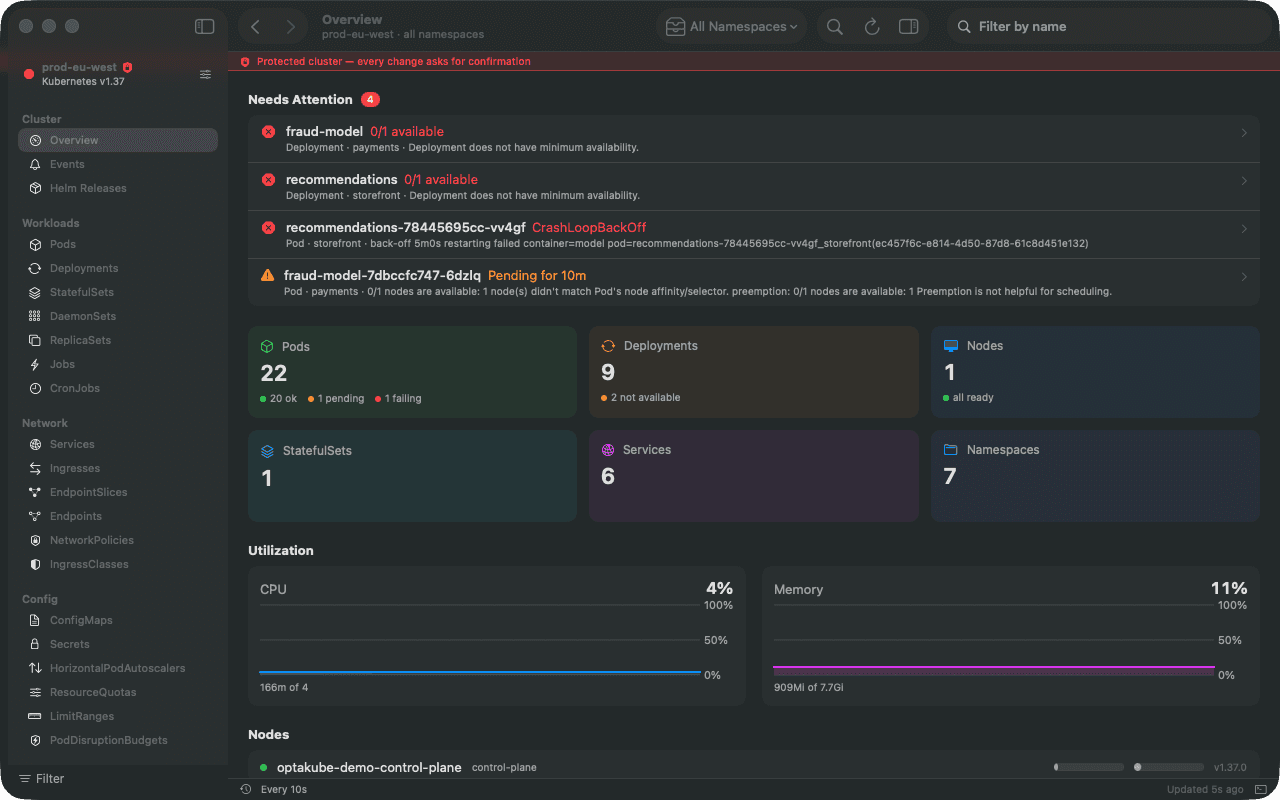
A real Kubernetes GUI for your Mac — open a window per cluster, watch resources update live, stream logs, drop into a pod's shell, edit and apply manifests, manage Helm releases, and run everyday actions without memorising another kubectl flag. Free and open source.
Highlights
Everything you reach for, in one native window
🪟
A Window Per Cluster
Connect to several clusters at once, each in its own window with independent namespace, view, and state. JetBrains-style: a welcome hub, then a window per session.
⚡
Live Updates
Tables update in real time over the Kubernetes Watch API — including self-hosted clusters with a private CA. Expired watches re-list cleanly, and bursts are coalesced so a 200-pod rollout stays smooth.
📊
Inline Metrics
CPU and memory bars right in the Pod and Node tables, per-container charts, and a cluster overview with utilization history and a health scan — crash loops, stuck pods, NotReady nodes and failed jobs, each one a link.
📜
Logs, Rebuilt
Workload logs that follow new pods as they appear. Regex search with a filter mode, level chips, ANSI colours, JSON that expands pretty-printed, and a time range — in tabs in the bottom dock or their own window.
⌨️
Embedded Terminal & Exec
A real PTY in the bottom dock — fish, zsh, bash — with your kubeconfig and the window's context, without switching the context in your real kubeconfig. Right-click any pod to drop straight into its container shell.
🎯
One-Click Actions
Restart, scale, and roll back deployments; port-forward; attach debug containers; trigger, suspend, or resume CronJobs; cordon, drain, and evict — all from the context menu.
Manage, Not Just Browse
Operate clusters end to end, from a native window
📦
Helm Releases
Browse Helm v3 releases across your clusters; inspect values, rendered manifest, and full revision history; roll back to any revision or uninstall — all read straight from the release Secrets, no helm binary required.
✏️
Edit & Apply YAML
View any resource's live manifest, edit it in a YAML-aware editor — syntax highlighting, auto-indent, no smart-quote surprises — with a unified diff before you commit, or paste one or more manifests to create them via server-side apply. Validate on the server first; field-ownership conflicts are shown before you force anything. Secrets are edited decoded.
🛡️
Access Review (can-i)
See exactly what your current credentials may do — a matrix of every resource type against get / list / watch / create / update / delete in the selected namespace.
☑️
Bulk Actions
Multi-select rows in any table to delete or restart many resources at once. The same actions, with the same confirmations, in every menu, the inspector and the command palette.
🔔
Cluster Events
A namespace- or cluster-wide event firehose, newest first, with a warnings-only toggle — fast triage when something's misbehaving, plus live per-resource events with a warning badge.
⭐
Saved Views & Label Filters
Filter any table by a real Kubernetes label selector (app=web,tier!=db), and pin namespace + type + filter combos to the sidebar to jump straight back.
🧭
Navigate Like a Mac App
⌘K finds any object, type or namespace; back and forward work across every view; the Related tab links owners, children and references — Deployment → ReplicaSets → Pods, Service → EndpointSlices → Pods.
🛑
Protected Clusters
Mark production protected and every change asks for confirmation, with a coloured strip across its window. A one-minute guided tour shows new users around.
Every Resource, Plus Your CRDs
30+ built-in types, and anything custom your cluster defines
Pods, Deployments, Services, Nodes, StatefulSets, DaemonSets, ReplicaSets, Jobs, CronJobs, ConfigMaps, Secrets, Ingresses, IngressClasses, PersistentVolumes, PVCs, NetworkPolicies, ServiceAccounts, HorizontalPodAutoscalers, Namespaces, EndpointSlices, Endpoints, Roles, RoleBindings, ClusterRoles, ClusterRoleBindings, StorageClasses, ResourceQuotas, PodDisruptionBudgets, LimitRanges, PriorityClasses, Leases, and admission webhook configurations — each with detail views, and YAML view / edit / diff / apply / delete. OptaKube also auto-discovers every Custom Resource Definition installed on the cluster and lets you edit those instances too, so your operators and platform CRDs are first-class.
⌘K
Command palette for every object, type, namespace, CRD and action
🔓
Reveal and edit Secret values decoded — no base64
↺
Revision diff and rollback for Deployments, StatefulSets and DaemonSets
Connects to Anything
Reads your existing kubeconfig — managed or self-hosted
🔑
Every Auth Method
Bearer tokens and token files, client certificates (EC and RSA), exec plugins for AWS EKS, GCP GKE and friends, impersonation, proxies, and $KUBECONFIG with multiple files. Exec commands run through your login shell, so your full PATH and env are available.
🔒
Self-Signed Welcome
Pins your cluster's certificate authority exactly like kubectl, so self-hosted clusters with private CAs just work — with clear, specific errors when a handshake fails.
Get Started in Seconds
From kubeconfig to a live cluster in under a minute
⬇️
Step 1
Download the DMG and drag OptaKube into Applications
📂
Step 2
It reads the same kubeconfig kubectl already uses — nothing to configure
🖱️
Step 3
Pick one or more clusters from the welcome window and connect
✨
Step 4
A live window opens per cluster — browse, stream, and operate right away
Who It's For
Anyone who runs workloads on Kubernetes
🧑💻
Platform & DevOps
Operate many clusters side by side — apply manifests, manage Helm releases, and keep production actions behind a confirmation.
🚨
SREs & On-Call
Live events, aggregated logs, inline metrics, and one-click restart / scale / rollback — fast triage when something's on fire at 3am.
🧰
Backend Developers
Drop into a pod's shell, stream logs, port-forward, and read Secrets & ConfigMaps inline — without memorising another kubectl flag.
Under the Hood
Native Swift, no web views, no Electron
OptaKube talks to the Kubernetes API directly over URLSession — no bundled kubectl proxy, no third-party HTTP stack. It starts instantly, sips memory, and feels like the Mac app it is.
Requirements
💻
macOS 14+
Sonoma or later
📄
A kubeconfig
The one kubectl already uses
🆓
Free & Open Source
MIT licensed